
Download HoverSnap – Free, Secure Screen Capture Tool for Windows
Looking for a lightweight, reliable, and easy-to-use screen capture tool? HoverSnap is a free, functional software designed specifically for Windows users who need to capture screenshots quickly and efficiently. Despite its release in 2005, HoverSnap continues to stand out in the crowded field of screen capture tools thanks to its minimal system footprint and intuitive interface.
This powerful yet simple application allows you to take snapshots of your screen with just a few clicks, making it ideal for designers, students, content creators, and professionals who frequently need to document visual content. Whether you're creating tutorials, reporting bugs, or saving important web content, HoverSnap delivers fast results without the clutter of unnecessary features. The software is compatible with Windows 95 and later versions, ensuring broad accessibility across older and modern systems alike.
With over 26,000 downloads since its addition to our catalog in 2005, HoverSnap has proven its reliability and enduring popularity. Best of all, it’s completely free to download and use, with no hidden costs or ads. Its secure design ensures your captures remain private and intact, and the minimal update frequency reflects its stable, bug-free nature.
If you're searching for a no-fuss, dependable tool to enhance your productivity, HoverSnap is an excellent choice.
Key Features of HoverSnap: Simple Yet Powerful
HoverSnap may be small in size, but it packs a punch when it comes to functionality. The software is built around the core idea of simplicity: capture your screen instantly with minimal effort. One of its standout features is the hover-and-capture mechanism—simply move your cursor over any window or area, and HoverSnap automatically captures it.
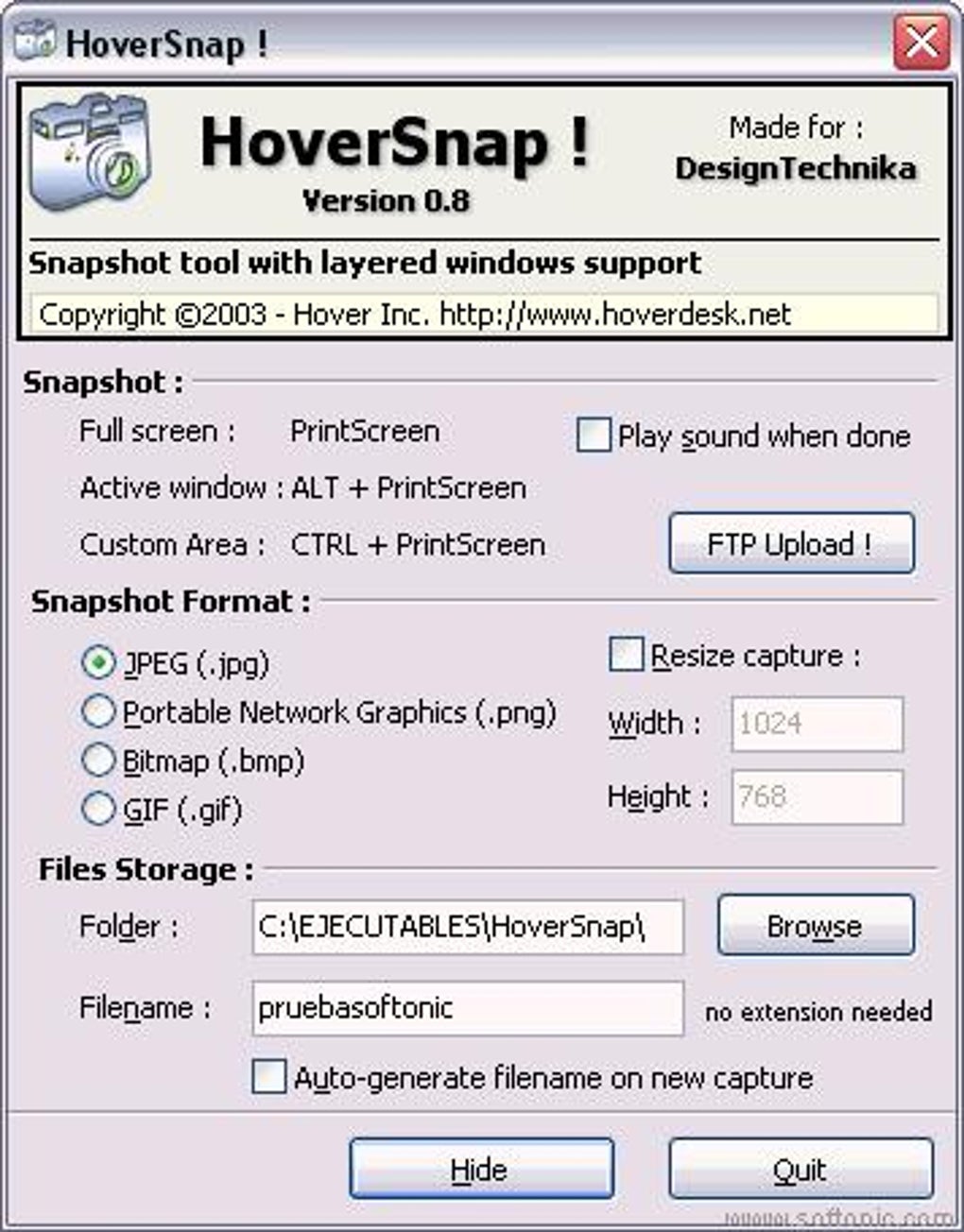
This eliminates the need to manually select regions, making it one of the fastest ways to take a screenshot on Windows. Another notable feature is the auto-save function, which stores your captures in a designated folder without requiring any manual intervention. You can customize the save location and file format (such as PNG or JPG), giving you full control over your workflow.
The tool also supports delayed capture, allowing you to set a timer before the screenshot is taken—perfect for capturing menus or pop-ups that appear after a few seconds. Additionally, HoverSnap integrates seamlessly with the system tray, so it runs quietly in the background without consuming resources. It doesn’t require installation, meaning you can run it from a USB drive or portable storage, making it ideal for use on multiple machines.
The software also includes a basic editing mode, where you can crop, annotate, or add simple text to your screenshots before saving. While not as advanced as full-fledged image editors, this feature is sufficient for quick fixes. With no ads, no telemetry, and no forced updates, HoverSnap maintains a clean, secure experience that users can trust.
How to Install and Use HoverSnap on Windows
Getting started with HoverSnap is incredibly straightforward, especially for users who prefer lightweight tools that don’t require complex setup. Since it’s a portable application, you don’t need to install it—just download the executable file from the official website or trusted source, and run it directly. The process takes less than a minute.
Once launched, HoverSnap appears in your system tray, ready to use. To take a screenshot, simply move your cursor over the window or area you want to capture. The moment you hover, the software automatically captures the content.
You’ll receive a quick preview, and you can choose to save, edit, or discard the image. For more control, right-click the HoverSnap icon in the system tray to access the settings menu. Here, you can configure options like default save folder, file format, delay time, and auto-save preferences.
If you need to capture a specific region, you can enable the manual selection mode, which allows you to drag and define the capture area. The tool also supports keyboard shortcuts—though they are not customizable in the current version—making it easy to trigger captures without using the mouse. After capturing, the image is saved directly to your chosen location, and you can access it immediately.
Because HoverSnap doesn’t write to the registry or create unnecessary files, it leaves no trace after you close it, ensuring privacy and system cleanliness. It’s perfect for temporary use, shared computers, or environments where software installation isn’t allowed. For users on older Windows systems like Windows 98 or XP, HoverSnap remains fully functional, which is a rare advantage in today’s software landscape.
Compatibility and System Requirements
HoverSnap is designed with broad compatibility in mind, making it accessible to a wide range of users across different Windows environments. It officially supports Windows 95 and all subsequent versions, including Windows XP, Vista, 7, 8, 8.1, and 10. This backward compatibility is a major plus, especially for users still running legacy systems or those in educational institutions with older hardware.
The software is lightweight, requiring only a few megabytes of RAM and minimal CPU usage, which ensures smooth performance even on low-end machines. It doesn’t require administrator rights to run, so it’s ideal for restricted user accounts or public computers. HoverSnap is distributed as a single executable file, meaning there’s no installation wizard, no setup process, and no risk of corrupted registry entries.
This makes it safe to use on shared or sensitive systems. The app is available in English only, but its intuitive interface and minimal text make it easy to navigate regardless of language proficiency. While it doesn’t support macOS, Android, or iOS, its focus on Windows ensures optimal performance and stability.
For users seeking a cross-platform solution, HoverSnap isn’t the answer—but for Windows users who value simplicity and reliability, it’s a top-tier choice. The software has remained largely unchanged since its last update in 2005, which speaks to its stability and minimal bug rate. This lack of frequent updates is not a flaw but a feature: it means the software is mature, well-tested, and doesn’t introduce new issues with every release.
Pros and Cons of Using HoverSnap
- Pros:
- Free and completely ad-free
- Extremely lightweight and fast
- Portable—no installation required
- Works on Windows 95 and later
- Auto-capture with hover functionality
- Simple, intuitive interface
- Supports delayed capture and basic editing
- Secure and privacy-focused
- Cons:
- No customization of keyboard shortcuts
- Limited to Windows platform only
- No cloud sync or sharing features
- Outdated interface (last updated in 2005)
- Only supports English language
Frequently Asked Questions (FAQ)
- Is HoverSnap safe to download and use?
Yes, HoverSnap is safe to download and use. It’s a lightweight, portable application with no known malware or tracking components. The software runs in the background without modifying system files or registry entries, making it secure for personal and professional use.
- Can I use HoverSnap on Windows 10 or Windows 11?
Yes, HoverSnap is fully compatible with Windows 10 and Windows 11. Although it was last updated in 2005, its compatibility with modern Windows versions is well-documented and stable. It runs without issues on both 32-bit and 64-bit systems.
- Does HoverSnap support keyboard shortcuts?
HoverSnap has built-in keyboard shortcuts for capturing screenshots, but they cannot be customized. The default shortcuts are functional but limited to the preset options provided by the developer.
- Can I edit my screenshots within HoverSnap?
Yes, HoverSnap includes basic editing tools such as cropping and adding simple text annotations. While it’s not a full image editor, these features are sufficient for quick fixes and minor adjustments before saving.
- Is HoverSnap available for Mac or mobile devices?
No, HoverSnap is currently only available for Windows operating systems. It does not support macOS, Android, or iOS. However, there are alternative screen capture tools available for those platforms.
Final Verdict: A Timeless Tool for Screen Capture
Despite being over 18 years old, HoverSnap remains a compelling choice for anyone in need of a fast, reliable, and free screen capture tool. Its minimalist design, hover-based capture system, and portability make it a standout option in a sea of bloated software. While it lacks modern features like cloud integration or customizable shortcuts, its core functionality is flawless and efficient.
For users who prioritize speed, security, and simplicity over flashy interfaces, HoverSnap delivers exactly what it promises—zero hassle, maximum results. Whether you're a student taking notes, a professional documenting workflows, or a designer saving UI elements, this tool fits seamlessly into your routine. Its compatibility with older Windows systems is a rare and valuable advantage.
If you're looking for a lightweight, free, and secure way to capture your screen, download HoverSnap today and experience a piece of software history that still works perfectly in 2024.
Download HoverSnap now and enhance your productivity with a trusted, no-frills screen capture solution.







